

Download - http://www.murgee.com/auto-mouse-click/download/setup.exe
Once you download and install it, run the program.
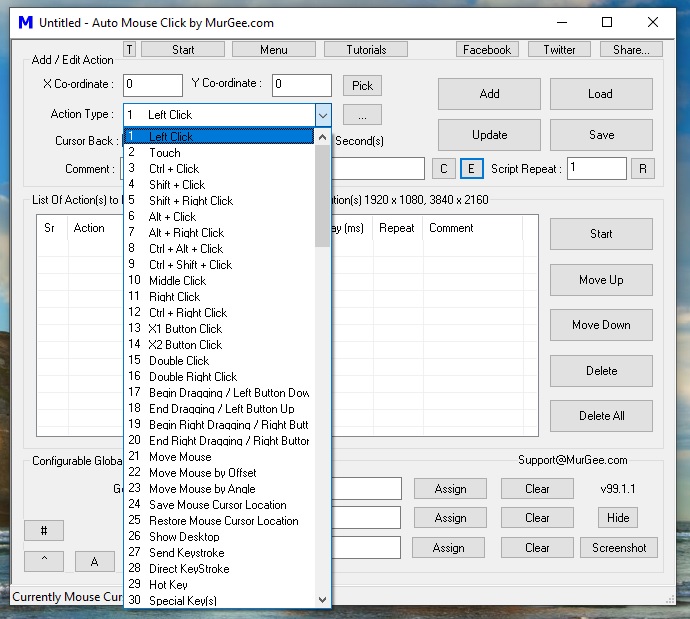
Step 1: Once you run it, you will see a box like this pop up -CLICK THE SPOILER-
STEP 2:
Where it says Cursor Back: there will be a checkbox, check it, then it will say Delay before Click 1000 miliseconds, change it from 1000 to 0!
STEP 3:
Where it says Get Mouse Curser Position, put that as 6 then click on ASSIGN (REMEMBER TO CLICK ON ASSIGN!)
Now where it says Start / Stop Mouse Clicks, THIS WILL BE WHAT BUTTON YOU WILL PRESS TO AUTO SWITCH~ put it to F6 or something, just something that's easy to click while you hybrid then click on ASSIGN!
STEP 4:
Hover over lets say.. ahrims hood, then press 6 once, now go to the auto switcher and click on "Add"
Do this for every item that you want to switch, once you are done you will see a huge list of X/Y/Cursor Back/Delay coordinates etc...
Now you are ready to autoswitch,
OH! Remember, on the top right under Save Clicks it says "Repeat Count", PUT THAT AS 1 or else the auto switcher will keep on switching nonstop and you will have to restart your computer to fix it.
enjoy.
~ murgee.com for more tools / programs ~
I'll post a vid soon.
Once you download and install it, run the program.
Step 1: Once you run it, you will see a box like this pop up -CLICK THE SPOILER-
STEP 2:
Where it says Cursor Back: there will be a checkbox, check it, then it will say Delay before Click 1000 miliseconds, change it from 1000 to 0!
STEP 3:
Where it says Get Mouse Curser Position, put that as 6 then click on ASSIGN (REMEMBER TO CLICK ON ASSIGN!)
Now where it says Start / Stop Mouse Clicks, THIS WILL BE WHAT BUTTON YOU WILL PRESS TO AUTO SWITCH~ put it to F6 or something, just something that's easy to click while you hybrid then click on ASSIGN!
STEP 4:
Hover over lets say.. ahrims hood, then press 6 once, now go to the auto switcher and click on "Add"
Do this for every item that you want to switch, once you are done you will see a huge list of X/Y/Cursor Back/Delay coordinates etc...
Now you are ready to autoswitch,
OH! Remember, on the top right under Save Clicks it says "Repeat Count", PUT THAT AS 1 or else the auto switcher will keep on switching nonstop and you will have to restart your computer to fix it.
enjoy.
~ murgee.com for more tools / programs ~
I'll post a vid soon.


