
Step1:
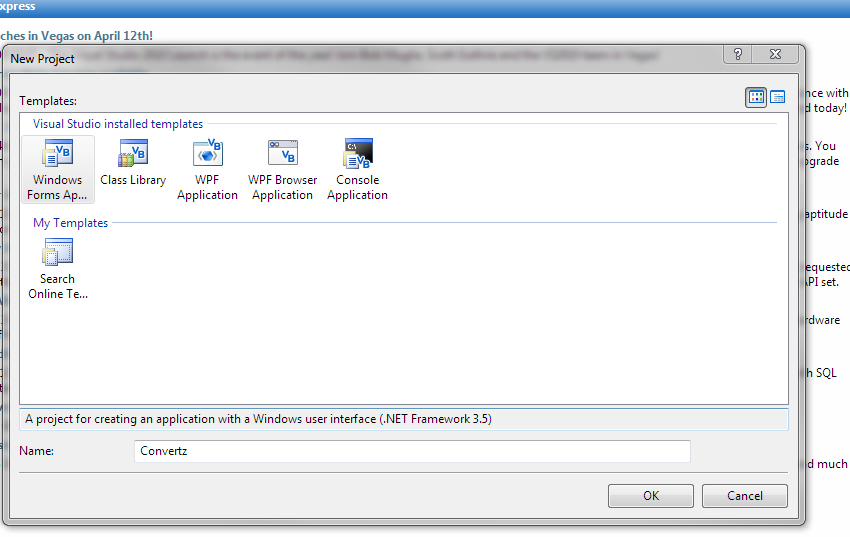
Create new Vb Project,
Name it what ever you want
Step2:
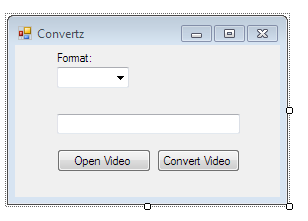
Add 2 Buttons, (Button1-Open Video)(Button2-Convert Video)
1 Textbox,
1 Combobox
and 1 OpenFileDialog
Step3:
Double Click OpenFileDialog1 and add this code
Dim file As String = OpenFileDialog1.FileName
TextBox1.Text = file

Step4:
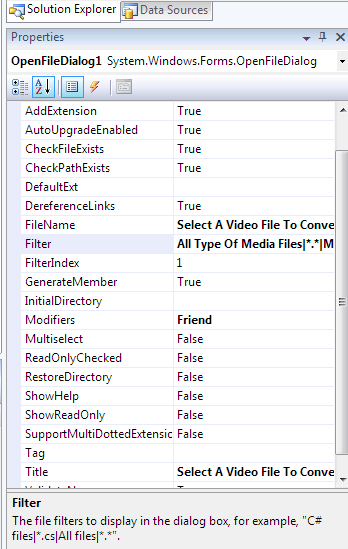
In OpenFileDialog1 Properties add this text into FileName and into Title
Select A Video File To Convert
And add this text into Filter
All Type Of Media Files|*.*|MPG2 Media Files [MPG]|*.mpg|Windows Media Video [WMV]|*.wmv|DIVX Media Files [DIVX]|*.divx|MOV Media Files [MOV|*.mov|Flash Video [FLV]|*.flv
Step5:
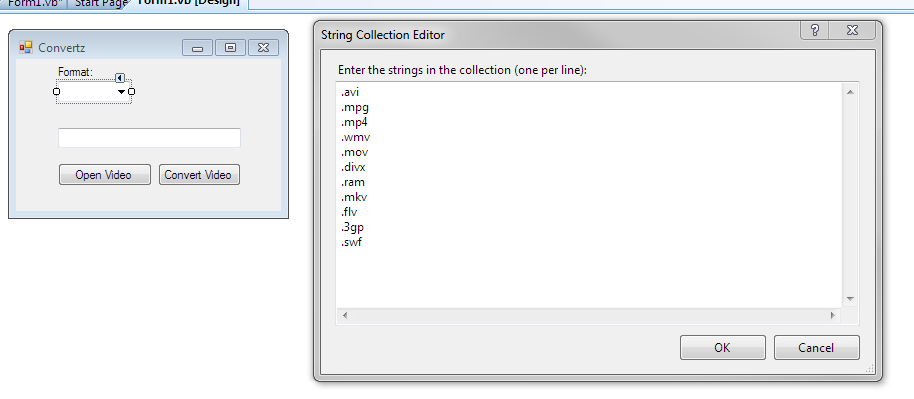
Now Go back to Form1.vb's Design and click the arrow above combo box one and click "edit Items" then add the following:
.avi
.mpg
.mp4
.wmv
.mov
.divx
.ram
.mkv
.flv
.3gp
.swf
Once added click "ok"
Step 6:
double click on button1 or "open video" and add this code:
OpenFileDialog1.showdialog()

step7:
Double click on Button2 or "convert Video" and add this code:
Dim type As String = ComboBox1.Text
If ComboBox1.Text = "" Then
MsgBox("No file type selected")
Else
End If
MsgBox("Video Has successfully been converted and saved " + TextBox1.Text)
Dim oldFile As String = Mid(TextBox1.Text, 1, Len(TextBox1.Text) - 4)
FileCopy(TextBox1.Text, oldFile + type)

Step8:
test it ;D

Downloads:
This tutorials Texts File--
http://zi.ma/57f953
This tutorials source Code--
http://zi.ma/e7c802
Create new Vb Project,
Name it what ever you want
Computer][
 ]
]
Step2:
Add 2 Buttons, (Button1-Open Video)(Button2-Convert Video)
1 Textbox,
1 Combobox
and 1 OpenFileDialog
Step3:
Double Click OpenFileDialog1 and add this code
Dim file As String = OpenFileDialog1.FileName
TextBox1.Text = file
Step4:
In OpenFileDialog1 Properties add this text into FileName and into Title
Select A Video File To Convert
And add this text into Filter
All Type Of Media Files|*.*|MPG2 Media Files [MPG]|*.mpg|Windows Media Video [WMV]|*.wmv|DIVX Media Files [DIVX]|*.divx|MOV Media Files [MOV|*.mov|Flash Video [FLV]|*.flv
Step5:
Now Go back to Form1.vb's Design and click the arrow above combo box one and click "edit Items" then add the following:
.avi
.mpg
.mp4
.wmv
.mov
.divx
.ram
.mkv
.flv
.3gp
.swf
Once added click "ok"
Step 6:
double click on button1 or "open video" and add this code:
OpenFileDialog1.showdialog()
step7:
Double click on Button2 or "convert Video" and add this code:
Dim type As String = ComboBox1.Text
If ComboBox1.Text = "" Then
MsgBox("No file type selected")
Else
End If
MsgBox("Video Has successfully been converted and saved " + TextBox1.Text)
Dim oldFile As String = Mid(TextBox1.Text, 1, Len(TextBox1.Text) - 4)
FileCopy(TextBox1.Text, oldFile + type)
Step8:
test it ;D
Downloads:
This tutorials Texts File--
http://zi.ma/57f953
This tutorials source Code--
http://zi.ma/e7c802





