

Create a new Project > name it whatever
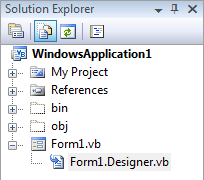
Step 1: Add Reference > DevComponents.DotNetBar2.dll, Now Solution Explorer > Show All Files
Step 2: double click the Form1.Designer.vb
Step 3: where it says
change it to
Step 4: Properties > EnableGlass > True
Step 5: Enjoy!
For MessageBoxes with a Better GUI
Step 1: Double Click The Form
Step 2: add
Step 3: the new messagebox code is
Step 1: Add Reference > DevComponents.DotNetBar2.dll, Now Solution Explorer > Show All Files
Step 2: double click the Form1.Designer.vb
Step 3: where it says
Code:
Inherits System.Windows.Forms.Form
Code:
Inherits DevComponents.DotNetBar.Office2007FormStep 4: Properties > EnableGlass > True
Step 5: Enjoy!
For MessageBoxes with a Better GUI
Step 1: Double Click The Form
Step 2: add
Code:
Imports DevComponents.DotNetBarStep 3: the new messagebox code is
Code:
MessageBoxEx.Show("Test")


