Hey huys just posting files for the new Update for RGH running with XBLSE
1. Download Flash360 and Extract it to a folder called Flash360 of your HDD/USB for your JTAG/RGH
2. Run xex menu and open Flash360.xex
3. When Flash360 opens, Press X to backup NAND to file, then press A to save entire NAND to file.
Click to View Content
4. You will get a flashdmp.bin on your USB/HDD, extract it to your computers desktop
5. Open up JRunner, and in the top right add the newest dashboard (Currently 16537, if there is ever a newer dash I will update this post)
Click to View Content
6. Next to the Dash Selection, select your type of console (Retail, Glitch, Jtag)
Click to View Content
6a. If using RGH, make sure to select RGH1 or RGH2 from dropdown menu.
Click to View Content
6b. If using Jtag, make sure to select AUD_Clamp if you are using it
7. Select source file and open the flashdmp.bin file that was extracted to your desktop. Make sure under bad blocks tab on the right it says No Bad Blocks.
8. Enter your CPU key (Get it from xell or FTP). Check that CPU key is correct in text window
9. Open "Advanced XeBuild Options" in the upper right. Go to "JTAG and GLITCH common options" tab. Set your xell button and check the boxes at the bottom if you have a Demon or cygnos.
10. Click "Create Image," You should have a new file in the JRunner folder with a file called updflash.bin. Put this on the root of your USB with Flash360.
11. Open up xex menu again and launch Flash360.xex
12. Press A to write updflash.bin to NAND, then select if you are keeping the same KV or not. Then press START to ignore and then A to begin.
13. Wait for it to finish. Press any button to contine. Press back twice and your console will power down. UNPLUG YOUR POWER FOR 30 SECONDS BEFORE TURNING BACK ON!!!!
14. Plug console back in and turn on.
XeBuild / With XBLStealth.xex : https://mega.co.nz/#!ed8nACoJ!ECulDHd_Ht8WTCHF2fcRe5-3b6QoaCmxrZFYxtxDQR4
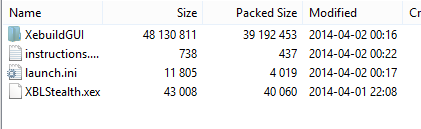
Also here is the new DashLaunch : http://www.homebrew-connection.org/files/xbox/system_apps/DashLaunch/dl_dash_launch_v3.12.zip
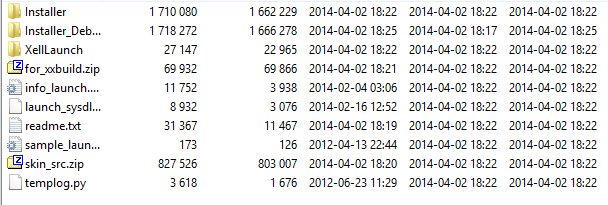
Here is Flash360 to get your current nad off your RGH : http://www.mediafire.com/download/mhtikfutynt/Flash360+v1.0.rar

Message me if you need any help with this or any xbox related issues
and here is a video
[video=youtube]http://api.viglink.com/api/click?fo...[/video]feature=player_embedded&v=W0TN6UTb2ZU
and yes if you run them threw virus tool you will pick up some stuff but the .xex files and there moddified so your always going to pick up stuff. I am on them right now so they work!!! just saying so don't go saying ohh its a virus and shit and thet I ratted you cause im not don't care...
1. Download Flash360 and Extract it to a folder called Flash360 of your HDD/USB for your JTAG/RGH
2. Run xex menu and open Flash360.xex
3. When Flash360 opens, Press X to backup NAND to file, then press A to save entire NAND to file.
Click to View Content
4. You will get a flashdmp.bin on your USB/HDD, extract it to your computers desktop
5. Open up JRunner, and in the top right add the newest dashboard (Currently 16537, if there is ever a newer dash I will update this post)
Click to View Content
6. Next to the Dash Selection, select your type of console (Retail, Glitch, Jtag)
Click to View Content
6a. If using RGH, make sure to select RGH1 or RGH2 from dropdown menu.
Click to View Content
6b. If using Jtag, make sure to select AUD_Clamp if you are using it
7. Select source file and open the flashdmp.bin file that was extracted to your desktop. Make sure under bad blocks tab on the right it says No Bad Blocks.
8. Enter your CPU key (Get it from xell or FTP). Check that CPU key is correct in text window
9. Open "Advanced XeBuild Options" in the upper right. Go to "JTAG and GLITCH common options" tab. Set your xell button and check the boxes at the bottom if you have a Demon or cygnos.
10. Click "Create Image," You should have a new file in the JRunner folder with a file called updflash.bin. Put this on the root of your USB with Flash360.
11. Open up xex menu again and launch Flash360.xex
12. Press A to write updflash.bin to NAND, then select if you are keeping the same KV or not. Then press START to ignore and then A to begin.
13. Wait for it to finish. Press any button to contine. Press back twice and your console will power down. UNPLUG YOUR POWER FOR 30 SECONDS BEFORE TURNING BACK ON!!!!
14. Plug console back in and turn on.
XeBuild / With XBLStealth.xex : https://mega.co.nz/#!ed8nACoJ!ECulDHd_Ht8WTCHF2fcRe5-3b6QoaCmxrZFYxtxDQR4
Also here is the new DashLaunch : http://www.homebrew-connection.org/files/xbox/system_apps/DashLaunch/dl_dash_launch_v3.12.zip
Here is Flash360 to get your current nad off your RGH : http://www.mediafire.com/download/mhtikfutynt/Flash360+v1.0.rar
Message me if you need any help with this or any xbox related issues
and here is a video
[video=youtube]http://api.viglink.com/api/click?fo...[/video]feature=player_embedded&v=W0TN6UTb2ZU
and yes if you run them threw virus tool you will pick up some stuff but the .xex files and there moddified so your always going to pick up stuff. I am on them right now so they work!!! just saying so don't go saying ohh its a virus and shit and thet I ratted you cause im not don't care...