


This method will earn you around 22,000 Cr every 7 min, if done properly.
It could be much more, if tweaked properly.
BTW, I am not going to reply to any PM's concerning this, due to the tutorial being STEP by STEP.
Make sure you have the following first:
Alright, now that we have all of those we can start on setting up iMacro.
Click the link above, and download the Add-on.
Now restart your browser.
After that, download BOTH macros for iMacro, and make a new folder called "ONI LEGENDARY" on your desktop. Put both files in the folder, then move that to C:\Users\YOU\Documents\iMacros\Macros.
(I'm not sure if that's where you move them for the chrome version of iMacro.)
Now we have the macros set up, moving on.
Now download the preset campaign save, and change the Profile, and Console ID's to yours, or it will not work, silly.
Now go to the website http://halo.xbox.com/en-us/Career/Challenges here and sign in with you Windows Live ID.
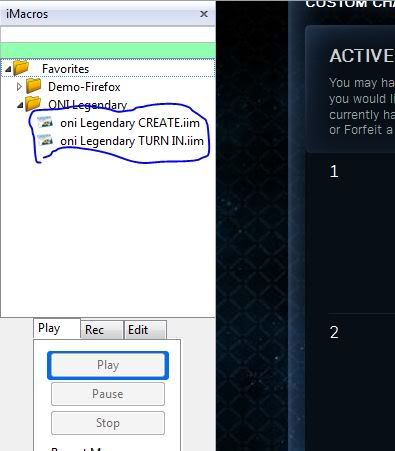
Now you have it pretty much set up, don't do anything on the webpage just click on "oni legendary create.iim", in your folder to create the custom challenges.
(This should be on the left side of your screen)
Do not do anything else while the challenges are being created, It will mess up if you do.
This is the time you go to your Xbox, and resume the campaign mission downloaded earlier..
You have two options now, either you can let it go for exactly 10 minutes, or revert to last checkpoint every time the second set of medals pop-up. If you do it the second way you should be ending the mission at around 1:30- 2:00 minutes in the game.
NOTE: Do NOT use a timer, use the game's clock because the game's clock goes slower, and those times are based off the game!
The second way is faster, but more tedious. I'll let you decide which one you wish to do.
Now you are ready to turn your credits in, either use the second macro provided, or click 'turn in' yourself, both ways take up about as much time.
IMPORTANT:
Both macros provided are set for 4 hours. You are saying what?
I know, this is difficult to understand, so bear with me.
Let's say you want to do this method and it is 6PM your time.
You will not get your Cr until 10PM after you turn it in.
So you do not unlock Cr automatically, although you can change the settings to 3 hours, shortest wait time, I believe.
If you start at six you want to keep boosting until the time ANY of your challenges will be turned in.
For example continue boosting until 9:55PM, if you have a challenge being turned in at 10PM.
You don't want to get any of that Cr because if you do you will hit the credit cap, and all that extra Cr, down the drain.
If you can get 1,000,000 Cr within the time frame you set up, more power to you!
If you can you want to adjust the macros time it tells the webpage to turn in your Cr, you do this by right clicking on the "oni legendary create.iim" macro, and selecting 'Edit Macro".
Change all the 4's in the picture to how many hours you want until the challenge will expire, or turned in.
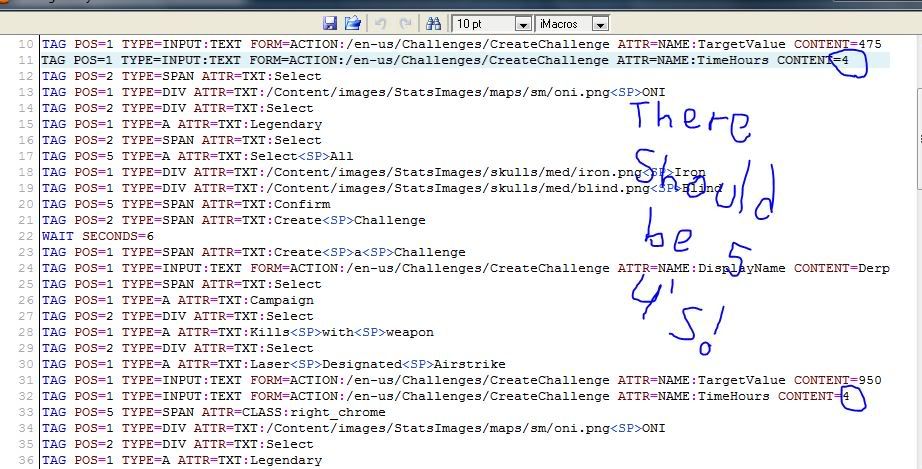
Your settings (in the macro) determine how long the challenge time limit is.
Do NOT make any challenges after 10PM, because the Reach servers restart at 1AM, so everything you do in that time frame is lost. And after you have all your boosting done, DO NOT come back online on Reach, before 1AM the next day or all your excess credits will be gone, and you'll only get 120k for that day.
I can't stress that part enough!
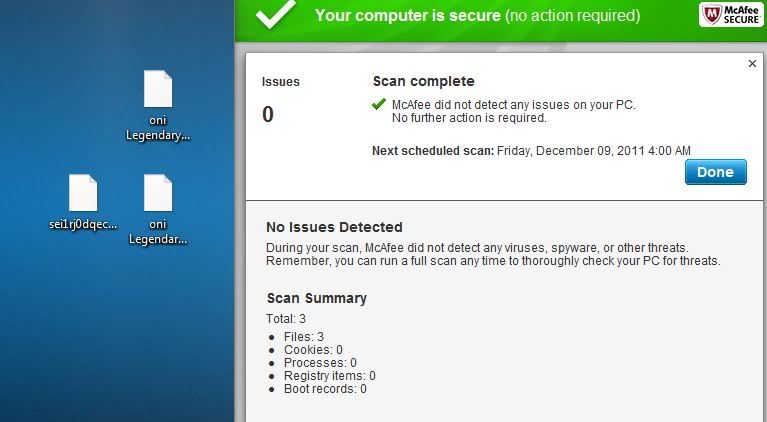
Virus Scan-
Notes:
Credit of Original Post- www.xboxmb.com/forum/63-halo-series/87530-%5Btut%5D-custom-challenge-boosting-up-1-000-000-cr-day.html
It could be much more, if tweaked properly.
BTW, I am not going to reply to any PM's concerning this, due to the tutorial being STEP by STEP.
Make sure you have the following first:
- http://www.mozilla.org Mozilla Firefox or
- http://www.google.com/chrome Google Chrome
- iMacros for either one
- https://addons.mozilla.org/en-US/firefox/addon/imacros-for-firefox Mozilla Add-on
- http://www.iopus.com/imacros/chrome Chrome Add-on
- Preset campaign save. (Must make your own, or will not work, sorry!)
TUT for making save.
Alright, well first off download http://xeraxic.com/software.php?aid=9 Liberty. After that take the save off your Xbox, and open it using Liberty.
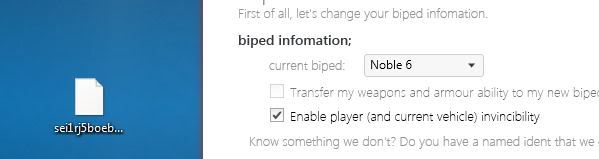
Now open it, and check invincibility.
Now go into campaign, and go do the target designater glitch.
When you think you have a good save bring it back onto the computer and mod it.
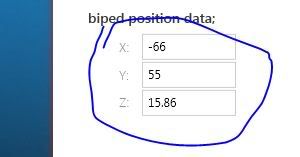
Now change you characters biped location to -66, 55, 15.86.
Now go to fine tuning.
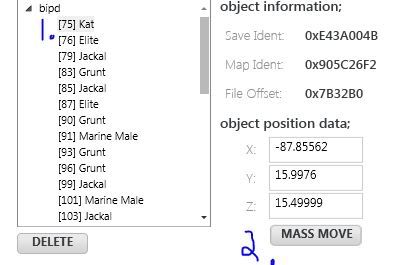
Select biped, then KAT.
Now click mass move, and change all their coordinate's to -66, 55, 15.86.
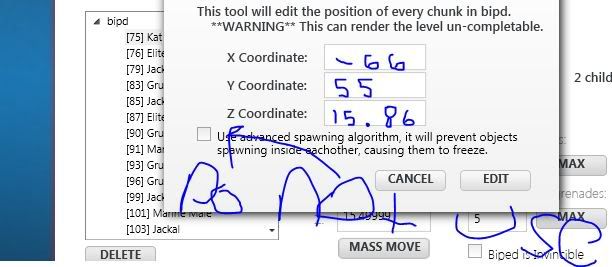
There will be a couple of bipeds that aren't moved, so you have to do it manually.
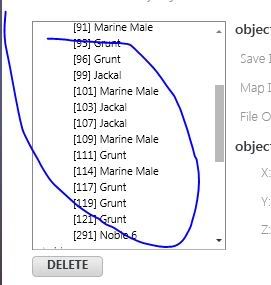
All you have to do now is go back, and un-check invincibility, then your done.
- and the macros, for iMacro.
- http://www.megaupload.com/?d=62DFSGQK Create Macro
- http://www.megaupload.com/?d=87TAXHBL Turn in Macro
- MOST IMPORTANTLY, patience.
Alright, now that we have all of those we can start on setting up iMacro.
Click the link above, and download the Add-on.
Now restart your browser.
After that, download BOTH macros for iMacro, and make a new folder called "ONI LEGENDARY" on your desktop. Put both files in the folder, then move that to C:\Users\YOU\Documents\iMacros\Macros.
(I'm not sure if that's where you move them for the chrome version of iMacro.)
Now we have the macros set up, moving on.
Now download the preset campaign save, and change the Profile, and Console ID's to yours, or it will not work, silly.
Now go to the website http://halo.xbox.com/en-us/Career/Challenges here and sign in with you Windows Live ID.
Now you have it pretty much set up, don't do anything on the webpage just click on "oni legendary create.iim", in your folder to create the custom challenges.
(This should be on the left side of your screen)
Do not do anything else while the challenges are being created, It will mess up if you do.
This is the time you go to your Xbox, and resume the campaign mission downloaded earlier..
You have two options now, either you can let it go for exactly 10 minutes, or revert to last checkpoint every time the second set of medals pop-up. If you do it the second way you should be ending the mission at around 1:30- 2:00 minutes in the game.
NOTE: Do NOT use a timer, use the game's clock because the game's clock goes slower, and those times are based off the game!
The second way is faster, but more tedious. I'll let you decide which one you wish to do.
Now you are ready to turn your credits in, either use the second macro provided, or click 'turn in' yourself, both ways take up about as much time.
IMPORTANT:
Both macros provided are set for 4 hours. You are saying what?
I know, this is difficult to understand, so bear with me.
Let's say you want to do this method and it is 6PM your time.
You will not get your Cr until 10PM after you turn it in.
So you do not unlock Cr automatically, although you can change the settings to 3 hours, shortest wait time, I believe.
If you start at six you want to keep boosting until the time ANY of your challenges will be turned in.
For example continue boosting until 9:55PM, if you have a challenge being turned in at 10PM.
You don't want to get any of that Cr because if you do you will hit the credit cap, and all that extra Cr, down the drain.
If you can get 1,000,000 Cr within the time frame you set up, more power to you!
If you can you want to adjust the macros time it tells the webpage to turn in your Cr, you do this by right clicking on the "oni legendary create.iim" macro, and selecting 'Edit Macro".
Change all the 4's in the picture to how many hours you want until the challenge will expire, or turned in.
Your settings (in the macro) determine how long the challenge time limit is.
Do NOT make any challenges after 10PM, because the Reach servers restart at 1AM, so everything you do in that time frame is lost. And after you have all your boosting done, DO NOT come back online on Reach, before 1AM the next day or all your excess credits will be gone, and you'll only get 120k for that day.
I can't stress that part enough!
Virus Scan-
Notes:
- My save is not perfect, far from it. Upload one if you think one is better.
- Re-read the thread if you have trouble, It takes time.
- If you are having trouble, try viewing ManiacTaylor's explanation http://www.xboxmb.com/forum/63-halo...halo-reach-cr-limit-you-can-reach-1-mill.html
- This page, http://www.se7ensins.com/forums/topic/608540-custom-challenges-farmingmethods . also helped me a little as well, gives the macro codes, if you want to just copy the whole thing.
Credit of Original Post- www.xboxmb.com/forum/63-halo-series/87530-%5Btut%5D-custom-challenge-boosting-up-1-000-000-cr-day.html


